
ShakerBot+
(Ready for Orders — Ships in Early Summer)
The fully programmable hardware mouse jiggler — with per-day scheduling, OTA updates, Bluetooth HID wireless mode, and a built-in web configurator. Keeps every device awake, on your schedule, invisibly.
From $38 · Free 3D print files included · OTA updates for life · Ships worldwide
What is ShakerBot+?
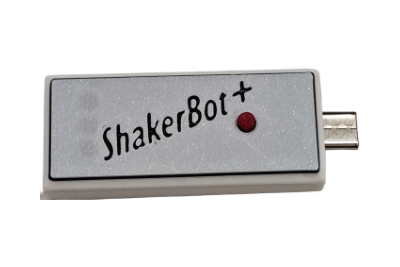
ShakerBot+ is a small hardware device that plugs into any computer, phone, tablet, or Chromebook and makes it think you never left. It acts exactly like a real mouse and keyboard — injecting randomized cursor movements and keystrokes to keep activity monitors, remote-work oversight tools, games, and streaming sessions running as if you’re right there. No software. No drivers. No admin rights needed.
See ShakerBot+ in action
Watch ShakerBot+ keep a session active — automatic, on schedule, invisible to monitoring tools.
Who uses a hardware mouse jiggler?
Mouse jiggler for remote workers
Stay “active” on Teams, Slack, and company oversight tools during calls, breaks, or deep focus time.
Anti-AFK mouse jiggler for PC gamers
Prevent idle timeouts in PC games — including Xbox-PC titles on Windows. Mid-raid, overnight farm sessions, and AFK penalty windows run uninterrupted.
Keep any screen live during presentations
No more screen dimming mid-slide. ShakerBot+ keeps presentation screens, dashboards, and demo machines awake through hours-long sessions — no keyboard tapping required.
Keep your computer awake during long renders & uploads
Renders, large downloads, backups, and uploads finish uninterrupted — no babysitting required.
Mouse jiggler for online classes & proctored exams
Keep online classes, proctored portals, and group video calls alive while you work.
What’s new in ShakerBot+
The original ShakerBot funded at 12× its Kickstarter goal. ShakerBot+ is the community-driven upgrade — every feature below came directly from backer feedback.
Per-day scheduling
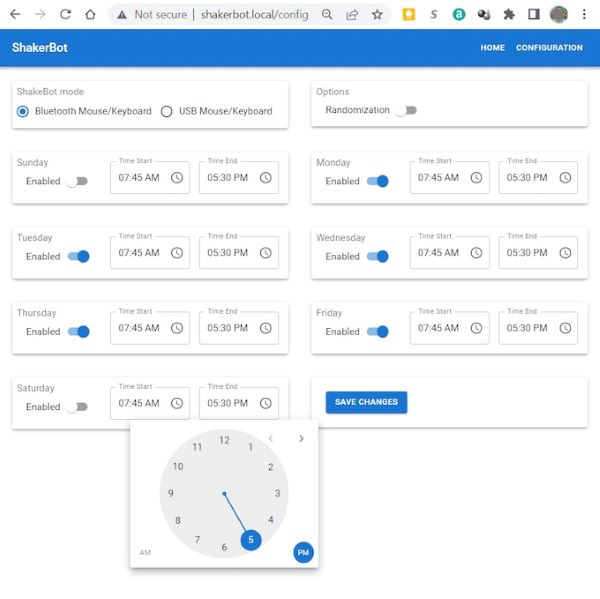
Set individual start and stop times for every day of the week. Randomization adds a few minutes on either end — so leaving early on Friday still keeps you covered.
OTA firmware updates
New features arrive wirelessly over Wi-Fi — no cables, no reflashing, no manual steps. Your ShakerBot+ just gets better over time.
Built-in web configurator
ShakerBot+ runs a mini web server on the device itself — no cloud, no app, no internet required. Open any browser on your local network, navigate to shakerbot.local, and your browser connects directly to ShakerBot+. Accessible any time, even while running.
Bluetooth HID — wireless mouse & keyboard
Switch to full Bluetooth HID mode and your computer sees ShakerBot+ as a wireless mouse and keyboard — no USB data connection to the host at all. USB keeps the device powered. Switch modes any time at shakerbot.local.
USB-C native
Reversible USB-C connector replaces the original USB-A plug. Optional USB-A adapter included with the case bundle.
Compact USB-C form factor
Redesigned board fits flush in laptop docks, travel pouches, and tight desktop setups. No awkward dangling dongle.
Human-like randomization algorithm
New movement algorithm produces varied paths, speeds, and micro-pauses virtually indistinguishable from a real human cursor.
Automatic NTP time sync over Wi-Fi
Automatically pulls accurate date, time, and day-of-week over Wi-Fi (NTP). No manual clock setting — ever.
Stealth mode — undetectable by IT monitoring
Hardware switch disables USB data lines entirely — host computer sees only a power draw, not a new HID device.
Specs
Built on the ESP32-S3 — the same chip family powering the best IoT hardware on the market today.
| CPU / Radio | ESP32-S3 — CPU, Wi-Fi, Bluetooth, and onboard storage in a single package |
| Connectivity | USB-C (data + power) · Bluetooth HID (USB used for power only in wireless mode) |
| Compatibility | Windows, macOS, Linux, ChromeOS, Android, iOS/iPadOS |
| Configuration | Built-in web server at shakerbot.local — browser connects directly to device, no cloud or app needed |
| Scheduling | Per-day start/stop times · NTP internet time sync · randomized edge windows |
| Firmware updates | OTA (over-the-air) via Wi-Fi — automatic, included for life |
| Simulation modes | Mouse movement · Keystroke injection · Combined mode |
| Stealth mode | Hardware USB data-line disable — power only, zero HID enumeration |
| Status indicators | 3 high-intensity LEDs (Red, Blue, Green) visible through case |
| Connector | USB-C · USB-A adapter included with case bundle |
| Case | Protective case (with-case bundle) · Free 3D print files for printing your own |
| Driver required | None — plug and play on all platforms |
| Origin | Designed and shipped from Texas, USA |
What’s in the box
ShakerBot+ vs software jigglers
Software jigglers require installation, admin rights, and get flagged by endpoint monitoring. ShakerBot+ is hardware — it looks like any ordinary mouse.
| Feature | ShakerBot+ | Software jiggler |
|---|---|---|
| Works on IT-managed / locked-down computers | Yes — no install needed | No — blocked by admin policy |
| Requires software install or admin rights | No | Yes |
| Works on phones, tablets, Chromebooks | Yes | Rarely |
| Detectable by endpoint monitoring tools | No — appears as standard HID mouse | Often yes |
| Survives OS updates and reboots | Yes — hardware-based | Needs re-launch after reboot |
| Per-day scheduling | Yes | Limited or none |
| OTA updates / new features | Yes — automatic over Wi-Fi | Manual app update only |
| Stealth power mode | Yes | No |
Free 3D print files
Every ShakerBot+ order is eligible for a free download of a protective case (and reset button) in both 3MF (optimized for Bambu Lab X1C) and STL (universal) format. Download the files below — print at home or send to a service.
The without-case bundles are ideal if you own a 3D printer or want to fully customize the case.
FAQ
Will my IT department detect it?
ShakerBot+ registers as a standard HID mouse — identical to any ordinary USB mouse. Monitoring software sees normal pointer activity. Stealth power mode lets you go further: flip the hardware switch to disable USB data lines entirely so the host sees only a power draw.
What does the “+” stand for?
Next generation: native USB-C, smaller board, enhanced randomization algorithm, per-day scheduling with NTP time sync, OTA firmware updates over Wi-Fi, and a built-in web configurator running directly on the device. Every feature came from original Kickstarter backer feedback.
How do I set it up?
Plug ShakerBot+ into any USB port. Connect to the ShakerBot-XXX Wi-Fi network it broadcasts, then enter your home or office network credentials.
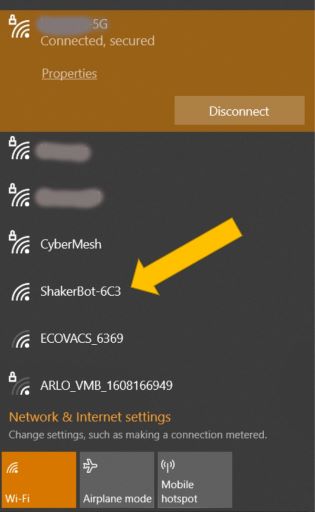
After ~20 seconds ShakerBot+ joins your network and syncs time automatically. Open any browser and navigate to shakerbot.local — this connects directly to the mini web server running on ShakerBot+ itself, not to any cloud or external service.
What are the free 3D print files?
Every ShakerBot+ order includes free 3D print files for the case — available in both 3MF format (optimized for Bambu Lab X1C) and STL format (universal, works with any slicer). Two case styles are included:
- Thin Stripe — clean accent line across the top panel
- Button — open cutout for direct hardware button access
Does it work on a Mac?
Yes — fully compatible with macOS, no drivers or permissions changes required. Connect via USB-C or use the optional USB-A adapter.
Can I use it wirelessly (Bluetooth)?
Yes. In Bluetooth HID mode your computer sees ShakerBot+ as a wireless mouse and keyboard — USB carries power only, not data. All mouse movement and keystroke injection happens over Bluetooth. Switch between USB mode and Bluetooth mode any time from shakerbot.local — no reset required.
Does it interfere with my normal mouse?
No. ShakerBot+ only injects movement during idle gaps. Your own mouse always takes priority — normal use is completely unaffected.
Does it work with PC games?
Yes — ShakerBot+ works with any PC game on Windows, macOS, or Linux, including Xbox-PC titles through the Xbox app on Windows. It prevents AFK timeouts and keeps sessions active during idle periods, farm runs, and overnight loops.
Note: ShakerBot+ is designed for computers, not gaming consoles. It does not work with standalone consoles (Xbox One/Series, PlayStation, Nintendo Switch, etc.) — those require USB peripherals built specifically for console use.
When does it ship?
Estimated delivery Early Summer 2026. Ships worldwide from Texas, USA.
Order ShakerBot+
Free 3D print files included with every order. OTA updates for life. Ships worldwide. Estimated delivery Early Summer 2026.
Without Case (3D print files included — print your own)
With Case (includes protective case + USB-A adapter)
All orders ship from Texas, USA · Worldwide shipping available · Estimated delivery Early Summer 2026